> ## Documentation Index
> Fetch the complete documentation index at: https://docs.marsmind.co/llms.txt
> Use this file to discover all available pages before exploring further.
# Generate knowledge from files or websites
> Upload material, choose a destination, and check the task result in Generation history.
Open **Knowledge Base → Knowledge Generation** in the sidebar.
## Generate from a document
1. Select **Generate from Document**.
2. Click the upload area or drop files into it. Supported types: `.pdf`, `.docx`, `.doc`, `.xls`, `.xlsx`, `.md`, `.txt`. Each file must be **100 MB or smaller**.
3. Wait for every file to upload successfully. Retry failed files, or remove them and upload again.
4. Under **Choose a destination**, choose a **Knowledge Scope**: Personal or Enterprise.
5. Open **Knowledge Category**, select an enabled group, then click **Confirm**. To add a group, use the management icon beside the field and follow the [group guide](/en/admin-backend/knowledge-base/groups).
6. Click **Submit generation task**. Review the document count and credits in **Confirm Credits Consumption**, then confirm. The current rate is **100 credits per document**.
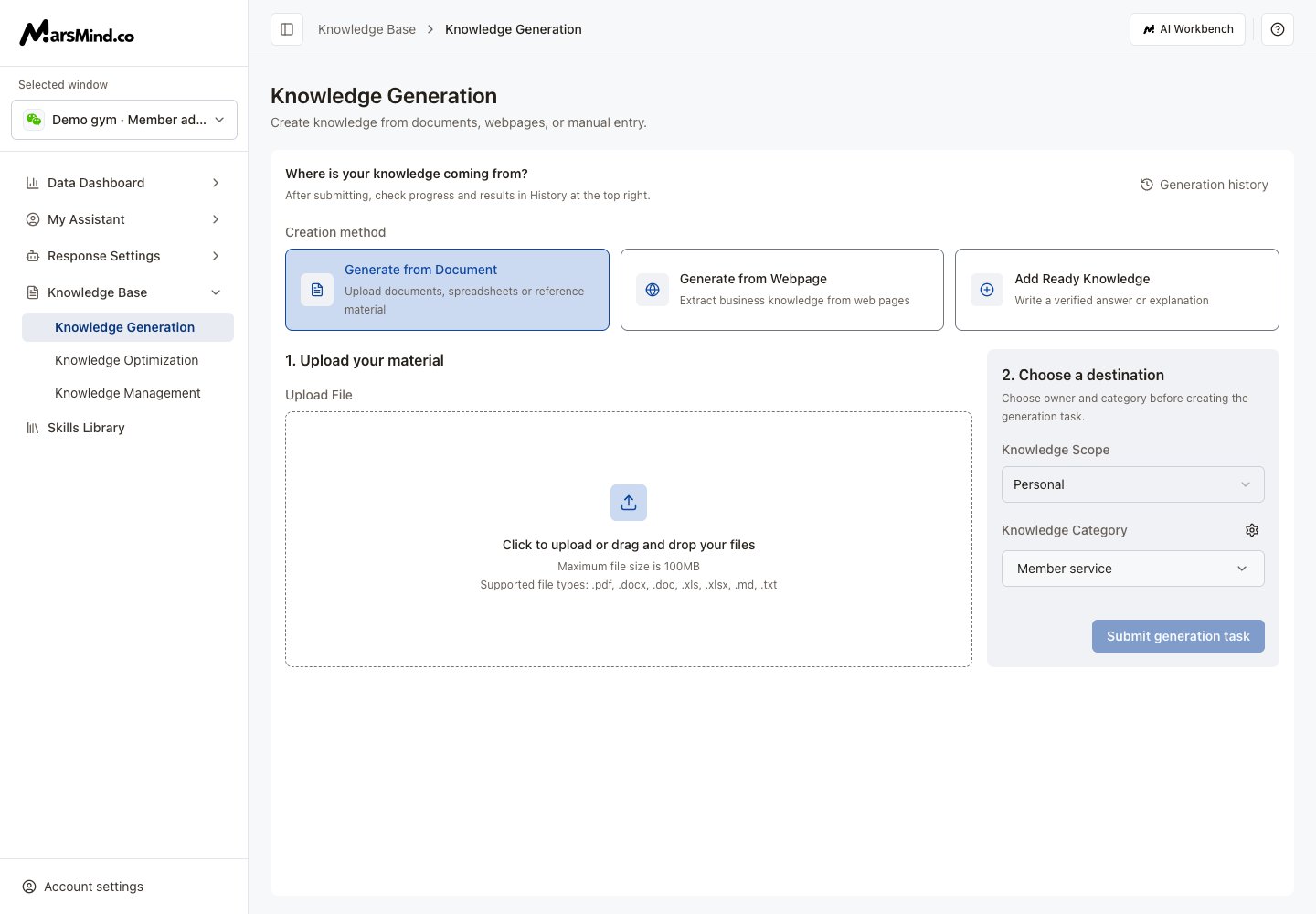 **Result:** A successful submission opens **Generation history**. Uploading a file alone does not submit a generation task.
## Generate from a website
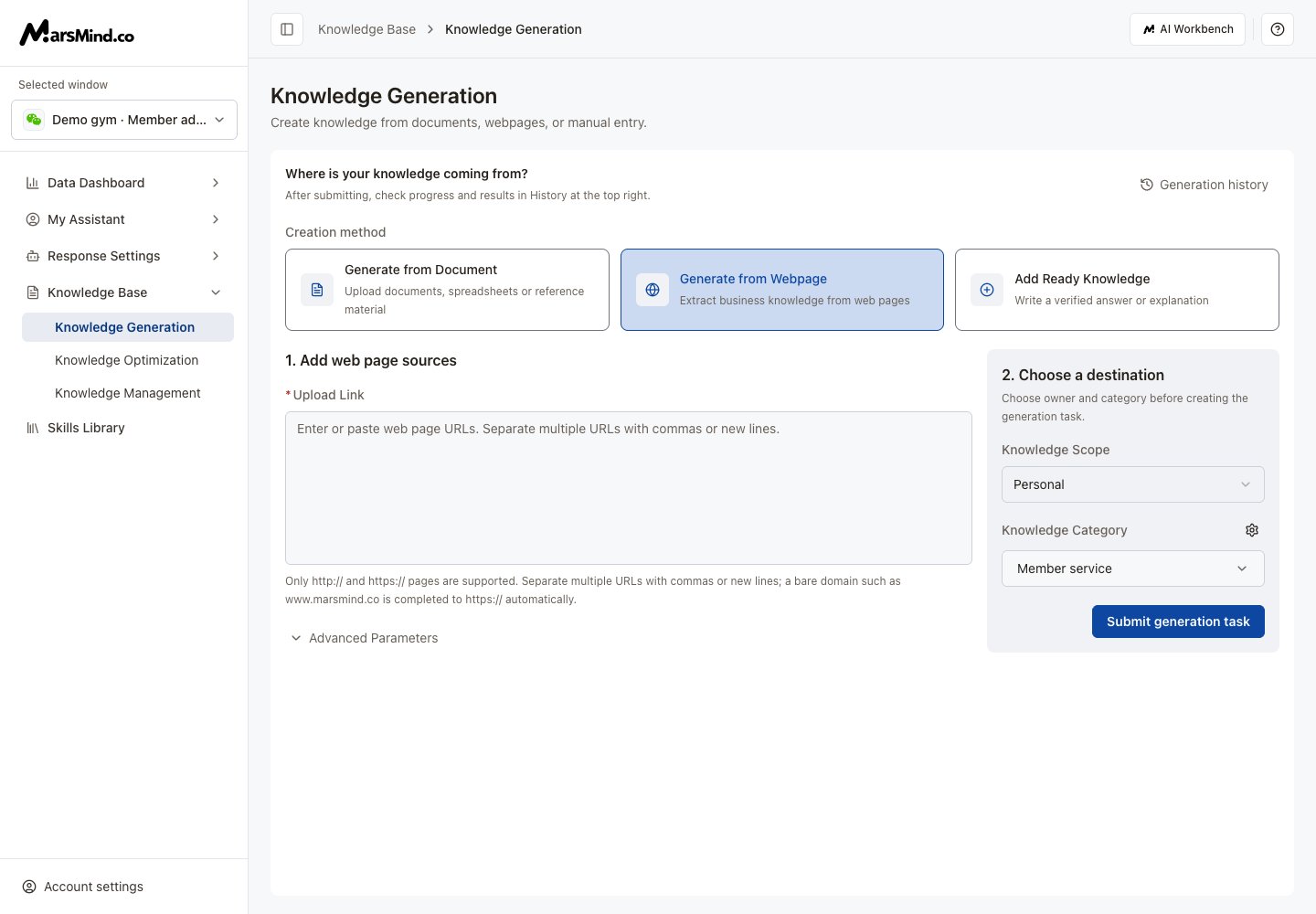
1. Select **Generate from Webpage** on the same page.
2. Enter URLs, separated by **commas or new lines**. Only `http://` and `https://` are supported. A bare domain is completed with `https://`.
3. Open **Advanced Parameters** if needed. Set Crawl Limit, Crawl Depth, Keywords, and whether to translate to Chinese. Limit and depth both default to **1** and must be at least 1.
4. Choose the knowledge scope and an enabled group, then confirm the group selection.
5. Click **Submit generation task**.
**Result:** Generation history opens with the submitted website task.
**Result:** A successful submission opens **Generation history**. Uploading a file alone does not submit a generation task.
## Generate from a website
1. Select **Generate from Webpage** on the same page.
2. Enter URLs, separated by **commas or new lines**. Only `http://` and `https://` are supported. A bare domain is completed with `https://`.
3. Open **Advanced Parameters** if needed. Set Crawl Limit, Crawl Depth, Keywords, and whether to translate to Chinese. Limit and depth both default to **1** and must be at least 1.
4. Choose the knowledge scope and an enabled group, then confirm the group selection.
5. Click **Submit generation task**.
**Result:** Generation history opens with the submitted website task.
 ## Check the result
1. Open **Generation history** at the top right. Search by task name or use pagination.
2. When a task shows **Processing complete**, click **View result** beside its name.
3. If knowledge still needs review, the task opens [Pending Review](/en/admin-backend/knowledge-base/audit). Otherwise, it opens [stored knowledge](/en/admin-backend/knowledge-base/maintenance).
## Check the result
1. Open **Generation history** at the top right. Search by task name or use pagination.
2. When a task shows **Processing complete**, click **View result** beside its name.
3. If knowledge still needs review, the task opens [Pending Review](/en/admin-backend/knowledge-base/audit). Otherwise, it opens [stored knowledge](/en/admin-backend/knowledge-base/maintenance).
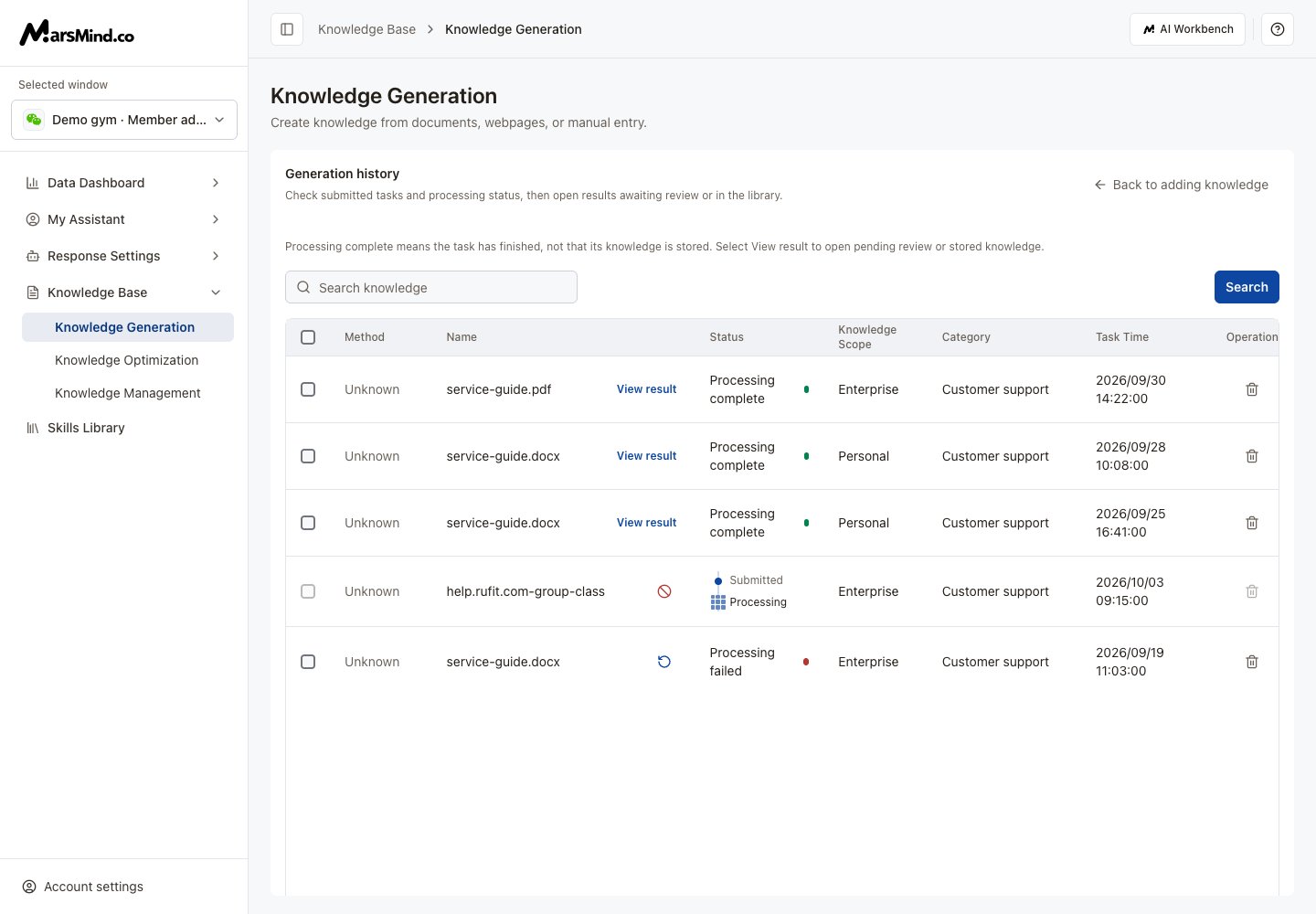 **Processing complete does not mean knowledge has been stored.** If results are empty, check pending review or clear the task scope and filters.
* **Processing:** Use the stop icon to stop a task. Processing tasks cannot be deleted.
* **Failed or stopped:** Use the retry icon to restart the task.
* **Delete a task:** Click its delete icon and confirm. This removes only the task record by default. Select **Also delete the knowledge generated from this document** to remove the corresponding knowledge as well.
* **Review status unavailable:** Try View result again later before uploading the same material again.
This documentation is built and hosted on [Mintlify](https://mintlify.com), a developer documentation platform.
**Processing complete does not mean knowledge has been stored.** If results are empty, check pending review or clear the task scope and filters.
* **Processing:** Use the stop icon to stop a task. Processing tasks cannot be deleted.
* **Failed or stopped:** Use the retry icon to restart the task.
* **Delete a task:** Click its delete icon and confirm. This removes only the task record by default. Select **Also delete the knowledge generated from this document** to remove the corresponding knowledge as well.
* **Review status unavailable:** Try View result again later before uploading the same material again.
This documentation is built and hosted on [Mintlify](https://mintlify.com), a developer documentation platform.