> ## Documentation Index
> Fetch the complete documentation index at: https://docs.marsmind.co/llms.txt
> Use this file to discover all available pages before exploring further.
# AI 用量
> 查看部门积分余额、月度消耗和用户用量明细。
查看部门剩余额度、每月消耗和用户明细。
入口:**数据看板** → **AI 用量**。
仅部门管理员可以访问。本页显示部门用量,不随左侧沟通窗口切换;普通账号没有此菜单。
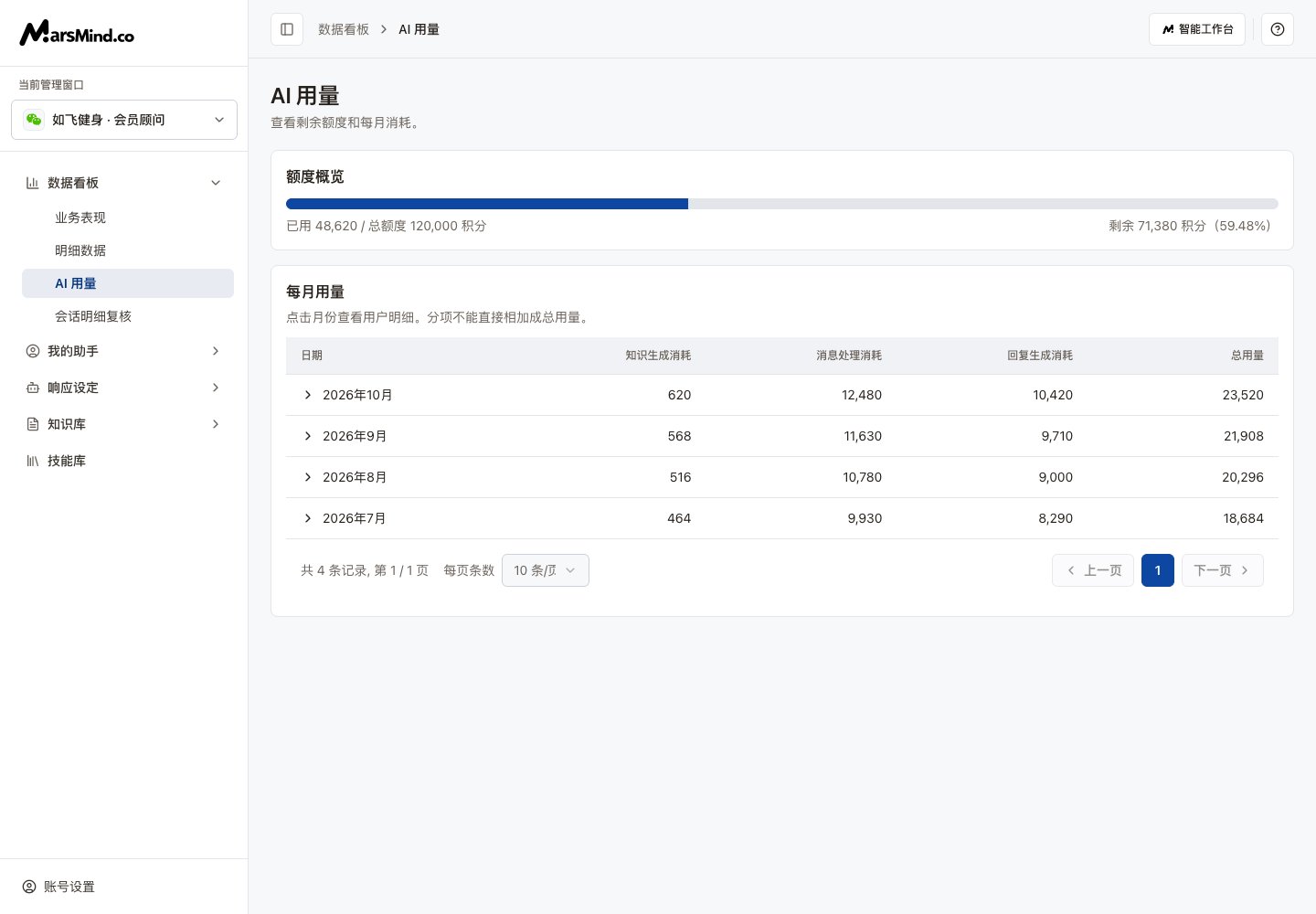 界面示例使用演示数据。
## 查看额度和用户消耗
查看已用积分、总额度、剩余积分和剩余比例。超额时还会显示额外用量。
列表按月份从新到旧排列。查看知识生成消耗、消息处理消耗、回复生成消耗和总用量。
点击月份左侧箭头或月份文字,查看该月各用户的消耗;再次点击收起。用列表底部分页和每页条数查看其它月份。
分项不能直接相加成总用量。已用、剩余和总用量采用服务端返回的计费口径;按页面显示的数值读取。
## 没有数据或读取失败时
出现 **加载失败** 时点击该区域的 **重试**。月份展开后的用户明细也有独立重试入口。**暂无记录** 或 **暂无用户详情** 表示当前返回的数据为空,不能当作读取失败。
This documentation is built and hosted on [Mintlify](https://mintlify.com), a developer documentation platform.
界面示例使用演示数据。
## 查看额度和用户消耗
查看已用积分、总额度、剩余积分和剩余比例。超额时还会显示额外用量。
列表按月份从新到旧排列。查看知识生成消耗、消息处理消耗、回复生成消耗和总用量。
点击月份左侧箭头或月份文字,查看该月各用户的消耗;再次点击收起。用列表底部分页和每页条数查看其它月份。
分项不能直接相加成总用量。已用、剩余和总用量采用服务端返回的计费口径;按页面显示的数值读取。
## 没有数据或读取失败时
出现 **加载失败** 时点击该区域的 **重试**。月份展开后的用户明细也有独立重试入口。**暂无记录** 或 **暂无用户详情** 表示当前返回的数据为空,不能当作读取失败。
This documentation is built and hosted on [Mintlify](https://mintlify.com), a developer documentation platform.